Multi-Tenancy in ASP.NET Core | Neon Serverless PostgreSQL Setup
Source: YouTube
Overview
This demonstrates building a ASP.NET Core application that is multi-tenant and utilises PostgreSQL. This is from the course ASP.NET development with PostgreSQL and Azure.
The notes for this course are only partial as I have no interest in using Neon. My mistake :-(
Create the project
This will be using the "ASP.NET Core Web App (Razor Pages)" template.
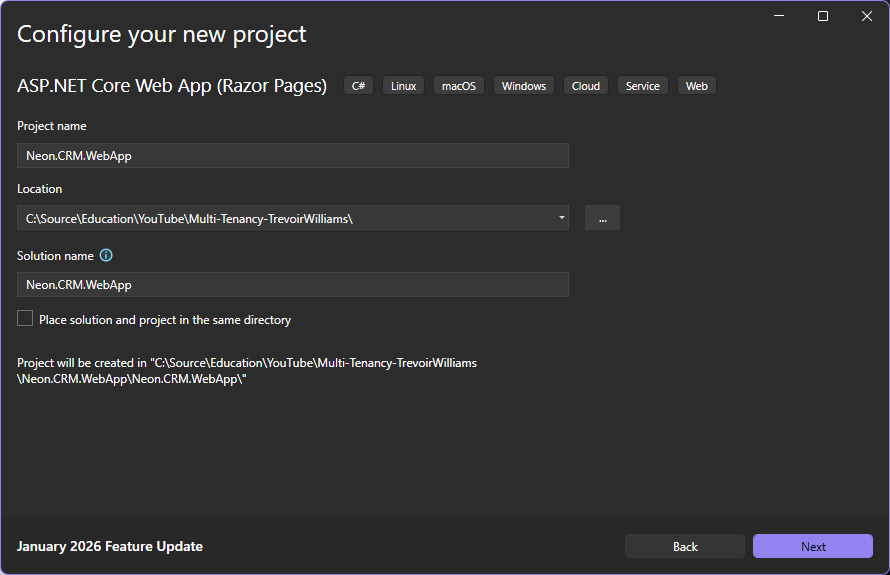
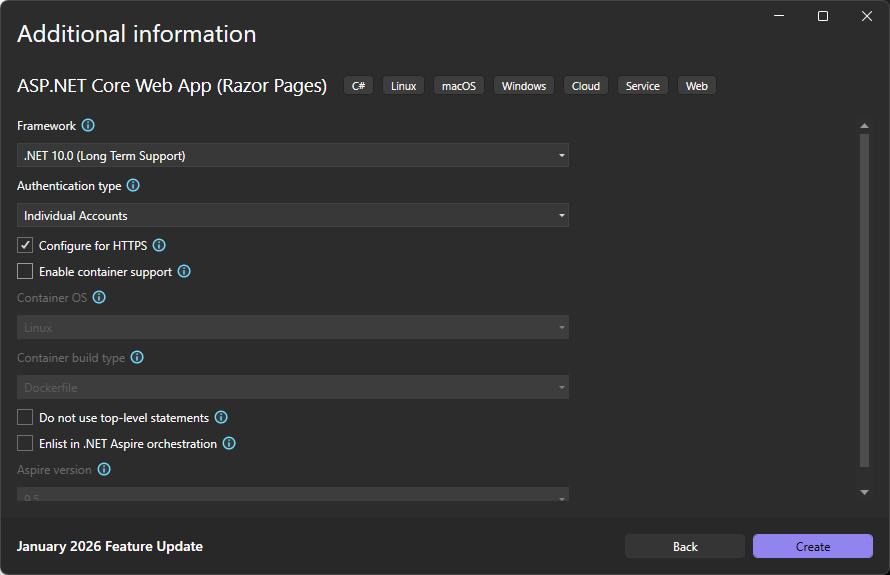
Add the following NuGet packages to the project (filtering with "entityframeworkcore" will help):
- Microsoft.EntityFrameworkCore.Design
- Microsoft.EntityFrameworkCore.Tools
By Choosing "Individual Accounts" in the project creation, the Tools and SQLServer packages are already installed. This example uses PostgreSQL, so add the package:
- Npgsql.EntityFrameworkCore.PostgreSQL
Redirect to our PostgreSQL Server
Over in the appsettings.json and add the connection string for "NeonCRMConnection":
"ConnectionStrings": {
  "DefaultConnection": "Server=(localdb)\\mssqllocaldb;Database=aspnet-Neon.CRM.WebApp-e6250349-b995-4c18-9e00-1df50f35d8b0;Trusted_Connection=True;MultipleActiveResultSets=true",
  "NeonCRMConnection": "Server=localhost;Database=NeonCRM;User Id=sa;Password=Your_password123;TrustServerCertificate=True;"
},
In Programs.cs change the connection string key to this new value, and replace UseSqlServer with UseNpgsql:
// Add services to the container.
var connectionString = builder.Configuration.GetConnectionString("NeonCRMConnection")
    ?? throw new InvalidOperationException("Connection string 'NeonCRMConnection' not found.");
builder.Services.AddDbContext<ApplicationDbContext>(options =>
    options.UseNpgsql(connectionString));
Add data models
Add a new folder Models to the existing Data folder.
Add the first data model class Agent. An agent is a user so can inherit from IdentityUser, we can add more columns to this base class:
using Microsoft.AspNetCore.Identity;

namespace Neon.CRM.WebApp.Data.Models;

public class Agent : IdentityUser
{
    public string? FirstName { get; set; }
    public string? LastName { get; set; }

    // Navigation property to the customers assigned to this agent
    public ICollection<Customer> Customers { get; set; } = [];
}
Then add a customer class in Customer.cs:
namespace Neon.CRM.WebApp.Data.Models;

public class Customer
{
    public int Id { get; set; }
    public string? Name { get; set; }
    public string? Email { get; set; }
    public string? PhoneNumber { get; set; }
    public string? Address { get; set; }
    public string? City { get; set; }
    public string? State { get; set; }
    public string? ZipCode { get; set; }

    public Agent? Agent { get; set; }
    public string? AgentId { get; set; } // Foreign key to Agent which is a string (assuming it's the Id of IdentityUser)
}
Note: Naming a column "Id" or "[ClassName]Id" will instruct EFCore to make this field the primary key.
With the models and navigation defined, we update the DbContext class (in ApplicationDbContext.cs) with them:
using Microsoft.AspNetCore.Identity.EntityFrameworkCore;
using Microsoft.EntityFrameworkCore;
using Neon.CRM.WebApp.Data.Models;

namespace Neon.CRM.WebApp.Data;

public class ApplicationDbContext : IdentityDbContext<Agent>
{
    public ApplicationDbContext(DbContextOptions<ApplicationDbContext> options) : base(options)
    {
    }

    // Nothing required for Agents as they are handled by IdentityDbContext<Agent>

    public DbSet<Customer> Customers { get; set; } = null!;
}
Notice how we update the type to use our updated data class for IdentityDbContext.
We must also update Program.cs so that the default identity user is set to Agent:
builder.Services.AddDefaultIdentity<Agent>(options => options.SignIn.RequireConfirmedAccount = true)
    .AddEntityFrameworkStores<ApplicationDbContext>();
Migrations are specific to the database they were designed for, since this project was created to use SQL Server, but we have changed this to use PostgreSQL, so we need to remove the entire migrations directory, then in the Package Manager Console issue the following command (with the default project set to our Web App - Neon.CRM.WebApp):
add-migration AddCRMTables
This creates a new migration in the context of PostgreSQL.
Creating a PostgreSQL Server
Trevoir uses a hosted PostgreSQL server site at https://neon.tech for his server, I chose to download a docker image for mine, using the terminal command:
$ docker run --name GeneralPostgreSQLServer -e POSTGRES_PASSWORD=mysecretpassword -p 5432:5432 -d postgres
(I used my usual dev password which doesn't have $$ symbols)
Now I can update the connection string in appsettings.json:
"ConnectionStrings": {
  "NeonCRMConnection": "Host=localhost;Port=5432;Database=NeonCRM;Username=postgres;Password=mysecretpassword;"
},
This should really be kept in a secret somewhere, or an environment variable, key vault, etc.
With this defined, back in the Package Manager Console we are ready to create the database:
update-database
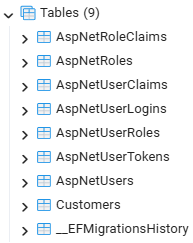
If we were to use a tool such as PgpAdmin4 we would be able to see the list of created tables:
Creating the Services
Now we can create the service clients to communicate with the API.
Add a top level Services folder to the project, and add the following classes to this:
NeonService:
namespace Neon.CRM.WebApp.Services;

public class NeonService
{
    private readonly HttpClient _httpClient;
    private readonly IConfiguration _config;

    public NeonService(HttpClient httpClient, IConfiguration config)
    {
        _httpClient = httpClient;
        _config = config;

        _httpClient.BaseAddress = new Uri(_config["NeonApi:BaseUrl"];

        // Add an API key to access the API if hosted on a service
        // like Azure API Management or Neon API Gateway
        //_httpClient.DefaultRequestHeaders.Authorization =
        //    new System.Net.Http.Headers.AuthenticationHeaderValue(
        //        "Bearer",
        //        _config["NeonApi:ApiKey"]);
    }
}
I'm aborting this course here as I have no interest in using Neon.